Introduction
Let’s set the stage for a moment. I recently tore apart my bare metal EVE-NG deployment and instead replaced it with a bare metal CML deployment. I just find that CML works better for me, at the moment - between some of the inexplicable UI bugs (e.g., you can’t reconnect a link to an interface you just disconnected until you refresh the EVE page) and the decision from the EVE-NG devs to not expose an easy way to create VLAN-tagged subinterfaces for the cloud interfaces/external connectivity (yes, I know you can do it from the underlying Linux interface config. no, I don’t want to lol), I’ve been a bit frustrated with EVE. I still like EVE, to be clear - I’m just switching it to running as a VMware VM as a backup to my bare metal CML for a rainy day.
Anyway, with that aside - imagine walking through the field of flowers that is adding back all of the nodes that I need into CML. I work with a LOT of vendors and products, so naturally that takes a while! When I got to adding in my Juniper devices, I managed to get vJunos-Switch and vJunos-Router working.
(FYI - I was about to manually create my own node definitions for these before realizing that a kind soul has already done the work for me and uploaded some pre-made node definitions for both of these vJunos devices to the CML community GitHub. If you also need node definitions for those devices, these work great - check them out!)
Unfortunately, when I got to adding in the virtual PTX router (aka vJunos-Evolved), I noticed that there wasn’t a pre-made node definition for it. No worries, I thought! I’m pretty familiar with CML, so no big deal to just whip up a quick node definition and copy the other parameters I need (e.g., the SMBIOS parameters) from the Juniper documentation. Pretty easy…until I tried booting it. I could’ve taken a picture of the terminal at this point, but rather than do that, I’ve got yet another brilliant idea! Let me use MS Paint to show you how the terminal looked.
Figure 1: What a beautiful terminal…just wish it had some words on it!
Just. Pitch. Black. Nothing happened! The node just didn’t boot.
Fortunately for me, I quickly remembered that the vJunos-Evolved requires EFI/UEFI boot. By default, the network emulation platforms will use a traditional BIOS to boot network devices. For most of them, especially the older platforms, this is perfectly fine! However, not for some of the modern ones, which require UEFI!
Pretty easy to enable EFI boot, I thought! Just tick this checkbox under the node definition configuration and…bippity boppity boop! EFI is enabled!
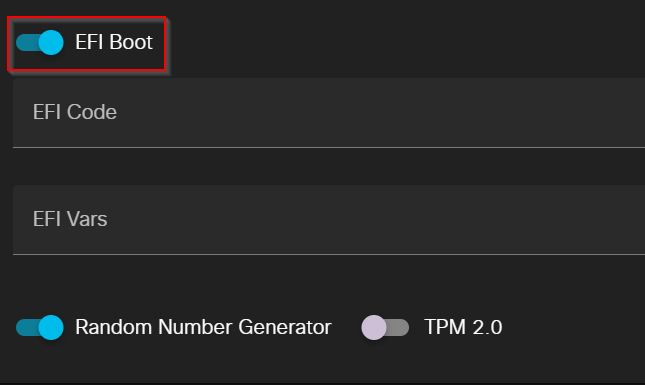
Figure 2: EFI boot checkbox under the node definition configuration
Well, at least, I thought that until I tried starting the node again and got this error message.
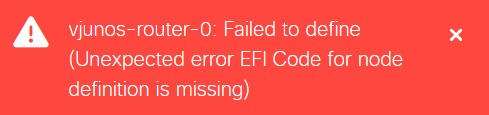
Figure 3: I like red as a color, but I don’t wanna see this right now!
Google’s showing zero results for this error message? Fine - time to troubleshoot!
One evening of many, MANY expletives that would make a sailor blush later, after diving into how CML starts other EFI-compatible VMs (literally a deep dive - I had to run virsh dumpxml and dive into the raw XML definition for the KVM VMs to get to this!), I wanted to write up a quick blog post to document it, in the hopes that you avoid the same expletive-filled afternoon!
Without further ado, let’sa go!
P.S. - if you want the actual node definition that I built for the vJunos-Evolved router, check out the link in the Conclusion section!
Enabling UEFI Boot for Custom Node Definitions
For context, there is a project called the Open Virtual Machine Firmware (OVMF), which provides open-source UEFI firmware for QEMU-based KVM VMs. For the uninitiated, network emulation platforms (e.g., CML, EVE-NG, GNS3) almost always run VMs using KVM/QEMU. As such, OVMF is perfect for booting these nodes using UEFI!
In the case of CML, however, the problem is that the default configuration only specifies the OVMF firmware files for the following nodes (as of version 2.9.1):
- IOS XRv 9000 (node definition ID:
iosxrv9000) - Nexus 9000v (node definition ID:
nxosv9000) - Windows 11 (node definition ID:
win11)
As a fun fact, this means that if you want to use UEFI with Windows 11 endpoints inside of CML, you really should use
win11as the ID for the node definition. More on why in a moment!
As of CML 2.9.1, there isn’t an easy way (that I know of, at least) to specify the EFI firmware files for custom node definitions in the CML web UI. However, it’s easy enough to do it in the CLI! Just go through the following steps:
- SSH into port 1122 for the CML server. If you’re unaware, this is the port number that you can connect to in order to directly administer the CML server using the underlying Ubuntu Linux CLI. If the SSH connection to tcp/1122 is failing, ensure that the SSH service (shown below) is enabled in the CML system administration Cockpit, accessible over HTTPS using port 9090.

Figure 4: The SSH service in Cockpit
- Run the
sudo -scommand and type in the password for thesysadminuser to log in to the CLI as therootuser - Navigate to the
/usr/share/edk2/ovmffolder. (cd /usr/share/edk2/ovmf) - Create a directory for the custom node type for which you want to configure EFI boot. IMPORTANT NOTE: CML will associate the EFI firmware files in this folder with the corresponding node definition based on the ID of the node definition. As such, the ID of the node definition MUST be exactly the same as the name of this folder. (
mkdir <node definition ID>) - Copy the “pure EFI firmware” file from the OVMF directory into the new folder. (
cp OVMF-pure-efi.fd <node definition ID>/efi_code.fd) - Copy the EFI vars file from the Win11 directory (I’ve found that this one consistently works for other custom node types) into the new folder (
cp win11/efi_vars.fd <node definition ID>/efi_vars.fd) - Ensure that the node definition has been fully created (i.e., the image/image definition should be associated with it)
- Drag out a new instance of that node type and start it up! At this point, it should work!
Conclusion
Did it work? Yes? Perfect! No? Well, worth a shot, eh? My advice, if it didn’t work, would be to check over your configuration and make sure you didn’t typo anything. Assuming everything looks good, try posting on the CML community on Cisco’s forums.
While Cisco’s official documentation for CML doesn’t really document the process for configuring EFI boot for custom node definitions, I’ve done my part by submitting the node definition file, alongside some brief instructions on setting up EFI boot, to the CML community GitHub that was linked above. As of now, my pull request (PR) to get that file integrated into the main repository is still pending Cisco approval, but hopefully that changes soon enough!
By the way - funnily enough, EVE-NG also has its issues with booting Cisco nodes that require UEFI boot, such as the latest Nexus 9000 and IOS-XR 9000 (post 24.1.2) virtual images. That’s because the default templates in EVE-NG don’t have the proper flags configured to boot the nodes using UEFI, as opposed to conventional BIOS, yet (at least, as of the time of writing this). If that continues to be the case going into the future, I’ll do another quick blog post explaining how to rectify that. Until then, catch ya on the flip side!